SYSTEM MAINTENANCE AND REPAIR TIPS STEP BY STEP.

Learn for free Computer Maintenance and Repair Tips and tricks.

COMPUTER SOFTWARE PROGRAMMING STEP BY STEP.

Learn a Programming Language-(Html, Css, C, C++, C#, Java etc.)

COMPUTER NETWORKING TIPS AND TRICKS STEP BY STEP.

Learn for free Computer Networking Tips and tricks.

BASIC COMPUTER TIPS AND TRICKS STEP BY STEP.

Boost Computer Performance,Computer Go Faster,Install Application etc.

COMPUTER KEYBOARD SHORTCUTS

Computer Keyboard Shortcuts Are Here.Win xp,Win 7,Win 8,Photoshop,Games,Basic shotcuts Etc.

COMPUTER PDF BOOKS

Computer Programming,Networking,Hardwaring,All Types Computer Related PDF Books.

HISTORY OF COMPUTER

All Information,Calculating Machines,Computer Data Storage Etc.

Showing posts with label TIPS-TRICKS. Show all posts

Thursday, December 12, 2013

How To Active Your Brain

Meditation has been scientifically proven to synchronize your left and right brain, allowing extremely beneficial changes in hemispheric thought communication, neural chemistry, and intellectual processing power. Its true, meditation super-charges your brain! 


What then, is the number one method of increasing my brain power? 

Meditation. There are an infinite number of ways meditation can increase your memory, brain power, and intelligence, here are a couple:


"Meditation gives you “whole brain synchronization”. 

Your brain has two hemispheres, left and right. Left hemisphere thinking is logical, practical, & mathematical. Right hemisphere thinking is non-linear, intuitive, abstract, big-picture focused, and creative. 


Tuesday, October 1, 2013

How To Clean Up Your Browser Cache

Clean Up Browser Cache

Step-1   Go Settings


Step-2     Go To The "Show advanced settings" Button.

 Step-3     And click "Clear browsing data".

 Step-4     Select "Empty the cache" And  Change "Obliterate the following items from" to "the beginning of time". And Click "Clear browsing data".


How to Delete a Facebook Account Permanently

Delete a Facebook Account Permanently 

Step-1     Loging Your Facebook Account 

Step-2     Then Click This Link To Delete Your  Facebook Account Permanently 

Step-3     Enter your password and Security Check And press “Okay” to permanently delete your account. You will need to wait 14 days for the deletion to take effect.


How to Completely Hide Folder And Files

Completely Hide Folder And Files

Step-1     Go To The Folder Or File Which One You Hide.


Step-2      select the address from the Address Bar and Select Copy.

Step-3     Click on the Start Button And Search Run.

And Type CMD.

Step-4    Open CMD And Type"   attrib +s +h   "Hit the Enter .


Thats it! your folder is now completely hidden from all users in all possible ways.

Step-5     To reverse the process simply  Type"   attrib -s -h   "Hit the Enter .   


Monday, September 2, 2013

How To Make My Computer Faster.

MAKE MY COMPUTER FASTER 

CCleaner is a freeware system optimization, privacy and cleaning tool. It removes unused files from your system - allowing Windows to run faster and freeing up valuable hard disk space. It also cleans traces of your online activities such as your Internet history. Additionally it contains a fully featured registry cleaner. But the best part is that it's fast (normally taking less than a second to run) and contains NO Spyware or Adware! :)
Cleans the following:
Internet Explorer
Firefox
Google Chrome
Opera
Safari
Windows - Recycle Bin, Recent Documents, Temporary files and Log files.
Registry cleaner
Third-party applications
100% Spyware FREE

Step-1     Select your Language then click Next. 


Step-2     Install Options then click Next.


Step-3    Free Google Toolbar (I don't Want to Toolbar Uncheak check button)click Next.


Step-4     Now Installing.


Step-5     Run CCleaner and Finish.
      

Step-6     Intelligently scan for cookies to keep click Yes.


Step-7     click Analyze Button.


Step-8     Needs to be Closed all browser the internet cache.

Step-9     now you run cleaner button.


Step-10     Delete Cache file from your system.

CLEANING COMPLETE 

Step-11     Run Again 

You See 0 bytes removed

Step-12     Now go registry and scan isses then fix selected issues


Step-13     Uninstall unused programs 
     

Step-14  now you refresh your computer...


Saturday, August 24, 2013

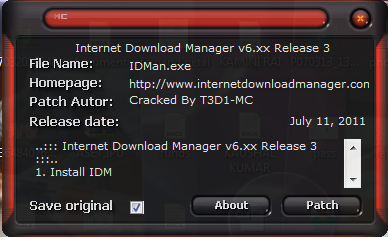
How To Get Internet Download Manager Full With Patch Step By Step

Internet Download Manager Full With Patch Step By Step

Step-1     DOWNLOAD  Internet Download Manager with this link --   


                                     DOWNLOAD HERE


Step-2     After installation you close your idm. 


Step-3  Now you go to your  C:\Windows\System32\drivers\etc -- open hosts file in Notepad. see like this


Step-4     And paste this text in notepad.


127.0.0.1    tonec.com

127.0.0.1    www.tonec.com
127.0.0.1    registeridm.com
127.0.0.1    www.registeridm.com
127.0.0.1    secure.registeridm.com
127.0.0.1    internetdownloadmanager.com
127.0.0.1    www.internetdownloadmanager.com
127.0.0.1    secure.internetdownloadmanager.com
127.0.0.1    mirror.internetdownloadmanager.com
127.0.0.1    mirror2.internetdownloadmanager.com

Like this..


Your Internet Download Manager is register

Step-5     now open your idm is register.


otherwise your registration is not successful so don't worry.


you DOWNLOAD this patch 
link

                            DOWNLOAD HERE

And click patch and Enter fast name then last name..

idm is register.

cheak your idm is full or not. go step 5


Sunday, August 18, 2013

How to Use Pen Drive as a RAM in Win XP and Win 7

Pen Drive as a RAM in Win XP
Step-1     Insert your Pen Drive in the USB port at least 1 GB.

Step-2     Right Click on My Computer -> Properties>Advanced -> Performance Settings.

Step-3     Click on Advanced -> Change

Step-4     Select the Pen Drive Click on Custom Size” Check the value of space available ” Enter the same in the Initial and the Max columns.


Now you have to restart the computer with pen-drive inserted. The speed of your computer will be increased.


Pen Drive as a RAM in Win 7


Step-1     Insert your Pen Drive in the USB port at least 1 GB.

Step-2     Open your My Computer.

Step-3     Right-click on Pen drive Icon and select 'Properties'.

Step-4     go to “ReadyBoost” tab

If you want to dedicate the entire space of your Pen drive for ReadyBoost you can select the radio button that “Use this device”.
Click Ok button and wait for process.

----configurations-------